Klaviyo Abandoned Cart Template: 3 Emails, Copy and Product Block Code
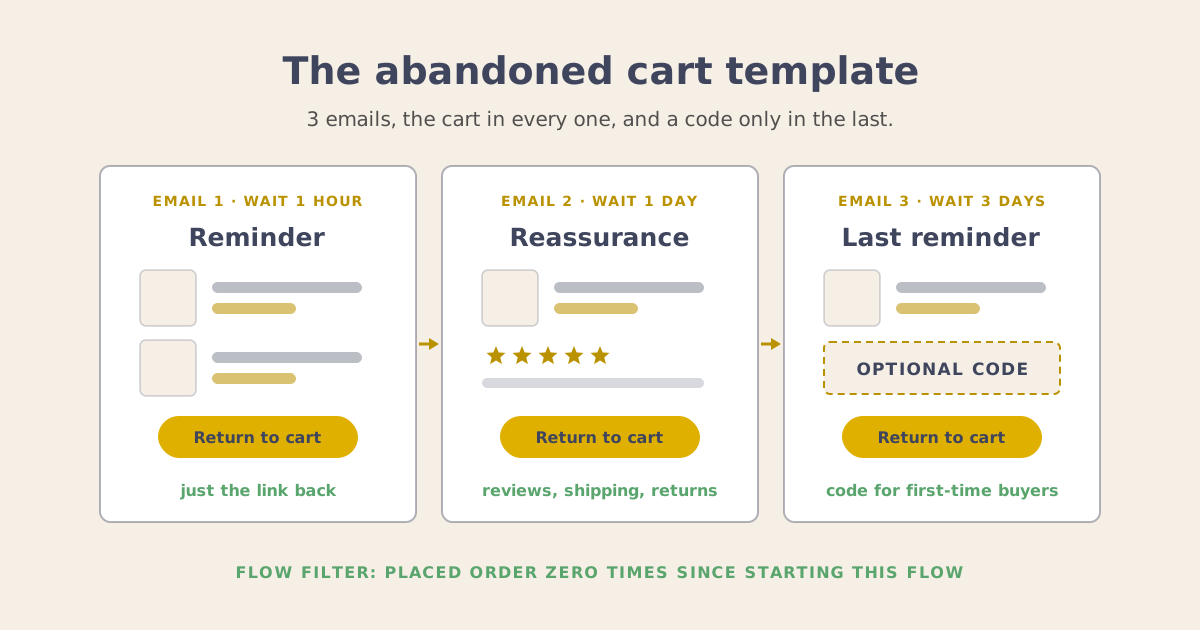
You pick Abandoned Cart Reminder from Klaviyo’s flow library, and the skeleton is built for you: a trigger, a filter, a 4-hour wait, and emails with a cart block and a Return to Cart button already in place. Then you open the first email, and the decisions that make it work are still yours. What each email says, when it goes out, and whether any of them carries a code.
This is the template I fill it with: 3 emails with one job each, the copy and blocks for each one, the product block code, the filter that stops the flow when someone buys, and the one place a discount belongs.
The reasoning behind each choice, including why this flow reports more revenue than it really earns, is in my post on what actually recovers revenue in a Klaviyo abandoned cart flow. This post is the template to copy.
The Klaviyo abandoned cart template at a glance
| Wait before it | Job | Discount | |
|---|---|---|---|
| 1 | 1 hour | Remind them, with a link back | None |
| 2 | 1 day | Answer the reason they hesitated | None |
| 3 | 3 days | Last reminder | Optional, first-time buyers only |
Each wait is a flow time delay, counted from the step before it. Klaviyo’s pre-built flow waits 4 hours before email 1. This template uses the common 1 hour, 1 day and 3 day spacing, which reaches an interrupted shopper while the cart is still on their mind. On store platforms that sync to Klaviyo less often, Klaviyo suggests waiting at least 1 hour and 15 minutes.
Abandoned cart flow trigger and filter in Klaviyo
Trigger: Started Checkout (listed as Checkout Started on Shopify). It fires when someone enters their details at checkout and moves to the next step, and it carries the full cart and a link back to that checkout.
Flow filter: Placed Order zero times since starting this flow. Klaviyo checks it before every email, so a purchase after email 1 stops emails 2 and 3. The pre-built flow includes it. Confirm it’s still there before you go live: a reminder about a cart someone already paid for is one of the faults I find most often in accounts.
Optional second flow: Added to Cart. It reaches people before they start checkout. Give it the filter Started Checkout zero times since starting this flow, so anyone who checks out moves to the main flow. On Shopify it needs Klaviyo’s app embed and the Track behavioral events setting.
Then turn off your store platform’s own abandoned cart emails, so each cart gets one set of reminders.
Abandoned cart email template: what each email says
All 3 emails share a frame: header, headline, a line or two of copy, the cart block, a Return to cart button, footer. The middle of each email is what changes.
Email 1: the reminder
Blocks in order: header, headline, 1 line of copy, cart block, Return to cart button, a line on how to reach you, footer.
Copy: “Your cart is saved. Everything you picked is below, and the button takes you straight back to checkout.”
Subject lines:
- Your cart is saved
- You left
{{ event.extra.line_items.0.product.title|default:'something' }}in your cart - Still deciding? Your cart’s right here
Preview text:
- Everything you picked, one click from checkout.
- Pick up right where you left off.
The second subject line uses the first item’s name, with “something” as the fallback. Keep this email free of discounts and urgency: the people opening it were mostly interrupted, and a link back is all they need.
Email 2: the reassurance
Blocks in order: header, headline, cart block, 2 or 3 short customer reviews, shipping cost and delivery time, returns policy, size guide if you sell sizes, Return to cart button, footer.
Copy: “Here’s what other customers say, when your order would arrive, and how returns work.”
Subject lines:
- What other customers say
- Free returns on everything in your cart (if you offer them)
- When your order would arrive
Preview text:
- Reviews, delivery times and returns, all in one place.
- The answers most people want before they check out.
By now the interrupted shoppers have bought, and the people left have a reason: shipping cost, sizing, delivery time, price. Repeat customers already trust you, so add a split on Placed Order at least once over all time and send them a shorter version with delivery and returns.
Email 3: the last reminder
Blocks in order: header, headline, 1 line of copy, cart block, the code with its expiry date (discount path only), Return to cart button, footer.
Copy: “Your cart is still saved. This is the last email we’ll send about it.”
Subject lines:
- Last reminder about your cart
- Your cart is still saved
- Your cart, now 10% off until Sunday (discount path)
Preview text:
- This is the last email about your cart.
- Your code works on everything in your cart until [date].
Klaviyo abandoned cart product block code
The pre-built emails include a cart block that repeats for each item. To build your own, paste this into an HTML block. It lists each item with its image, name, quantity and price, and every link goes back to that person’s checkout.
{% comment %}
Cart block for a flow triggered by Started Checkout (Checkout Started on Shopify).
Tags are Shopify's. line_price is the item price times the quantity.
{% endcomment %}
<table role="presentation" width="100%" cellpadding="0" cellspacing="0" border="0">
{% for item in event.extra.line_items %}
<tr>
<td width="120" valign="top" style="padding:12px 0;">
<a href="{{ event.extra.checkout_url }}">
<img src="{{ item.product.images.0.src }}" width="120" alt="{{ item.product.title }}" style="display:block;border:0;width:120px;height:auto;">
</a>
</td>
<td valign="middle" style="padding:12px 0 12px 16px;font-family:Arial,sans-serif;font-size:16px;line-height:24px;color:#333333;">
<a href="{{ event.extra.checkout_url }}" style="color:#333333;font-weight:bold;text-decoration:none;">{{ item.product.title }}</a><br>
Qty {{ item.quantity }} · {% currency_format item.line_price %}
</td>
</tr>
{% endfor %}
</table>
<table role="presentation" width="100%" cellpadding="0" cellspacing="0" border="0">
<tr>
<td align="center" style="padding:24px 0;">
<a href="{{ event.extra.checkout_url }}" style="display:inline-block;padding:14px 32px;background:#333333;color:#ffffff;font-family:Arial,sans-serif;font-size:16px;font-weight:bold;text-decoration:none;border-radius:4px;">Return to cart</a>
</td>
</tr>
</table>Before it goes live:
- It reads the trigger event, so it fills in only in a flow triggered by Started Checkout. Preview it with a test profile that has started a checkout.
- The tags are Shopify’s. Other platforms use different names, so in Preview & test, hover a property to copy its exact tag. Klaviyo’s tags follow Django, a template language. Code from a Shopify theme is written in Liquid, which looks similar and breaks the email.
line_priceis the line total, so 2 of a $12 item show as $24.- The no-code version is a table block set to Dynamic, with Row collection
event.extra.line_itemsand Row aliasitem. Added to Cart carries one product, so that flow uses a single product block.
When to add a discount to an abandoned cart email
A share of the people this flow brings back were coming back anyway, and a code in email 1 pays them for a purchase they’d already decided to make. Klaviyo’s help center gives the same advice: keep the coupon out of the first email, since discounting can train customers to abandon carts to get one.
So the code lives in email 3, for the shoppers where it changes the outcome:
- First-time buyers. Split on Placed Order zero times over all time. Repeat customers know you, and the reminder does the job.
- Smaller carts. A big cart usually hesitates over confidence, which email 2 answers. A split on cart value reads the total from the checkout event, so you can cap who gets the code.
- A unique code with a real expiry. Use a single-use code from Klaviyo’s coupons, with the expiry matching the date in the email.
A holdout, as the strategy post describes, shows what the flow really adds, and that’s the number to weigh the code’s margin against.
Abandoned cart email timing for your store
The 1 hour, 1 day and 3 day spacing is a convention and a sound place to start. Your account holds the real answer: how long abandoned checkouts take to turn into orders, and what share of the people abandoning have never ordered. A store selling $15 refills and one selling $900 chairs will get different answers, just as they get different reorder windows.
With Klaviyo connected to Claude through Klaviyo’s MCP connector, the plug-in that lets Claude read your account, you can ask both questions in plain English and get answers from your own events. The first answer sets the wait before email 1. The second tells you how many people the code would reach, and so what it costs. Ask when you build the flow, then again a year later.
If you’d like a second opinion on your abandoned cart flow before you rebuild it, book a strategy session.