Klaviyo MCP Server: What It Does, and When to Use the API
There are two ways to build in Klaviyo with Claude. One is the MCP connector: the link you switch on so Claude can read and act on your account. The other is the API underneath it: the developer route, which needs a key and someone comfortable with code. Which you reach for depends on what you are doing, and most of the time the connector does the job on its own.
I keep both open at once. Most of my work now happens in Claude Code, the version of Claude that runs on my computer rather than in a chat window, because it holds the connector and a key in the same place. When I build a flow, the connector does the building, and I reach for the API for the rest. There is no switching tools and no stopping to decide which is which.
The rest of this is what each one is best at.
A Connector Is a Keycard
Think of the MCP connector as the keycard a hotel gives you. It opens your room, the gym, the pool, the doors you actually use. The company chose that set on purpose, which is why the card works the moment it is handed to you: no keys, no permission settings, no documentation to read.
The API is the bigger keyring the staff carry. It reaches further into the building, because the company wrapped more of the place in a key. A few things stay with the front desk, handled in person by design.
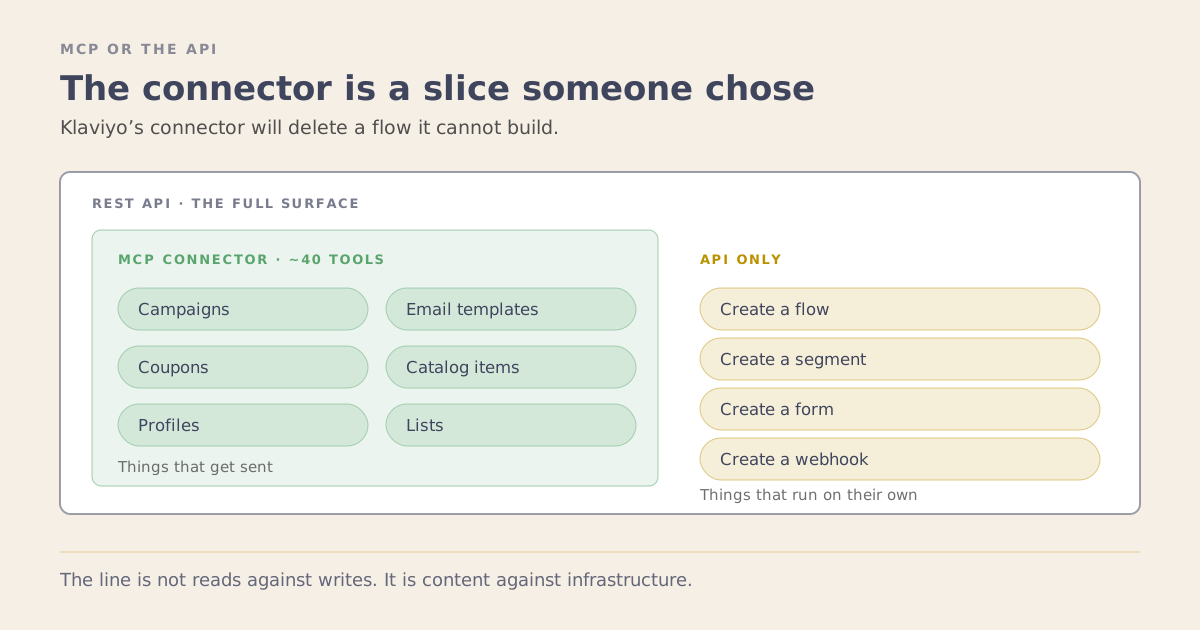
So a connector’s shape is a choice, which is the single most useful thing to understand about it. What the card covers is what the vendor decided you would reach for most, and the rest is waiting for you on the API.
What the Connector Actually Does
Start with the connector, because it does far more than people assume. It can create and edit most of the account: campaigns, flows, segments, lists, profiles, templates, catalogs, coupons, tags, translations, brand settings and more, and it can build, edit and publish sign-up forms. It reads essentially everything, and it carries all the reporting. For day-to-day marketing work, the connector is the workhorse.
A couple of jobs belong to the API or the interface instead:
- Creating or changing a webhook, the automatic notice Klaviyo sends another app when something happens. The connector reads and deletes the webhooks you already have. A new one, or a change to an existing one, comes from the API.
- Changing a form that is already live, or one with an A/B test. The connector can build a complete form, with its design, its timing and who sees it, edit it while it is a draft, and publish or unpublish it once you confirm. It cannot edit the live version of a form, and a form with an A/B test has to be published or unpublished from Klaviyo’s form editor.
There is a clean logic to the split. The connector and the API do the building, and the interface is where a person checks and decides. That matters most for anything that keeps running. Check anything the connector builds before it goes live, and take the most care with flows. A campaign goes out once, so a mistake reaches one send. A flow keeps sending to everyone who triggers it, so the same mistake repeats until someone notices. Klaviyo’s developer notes make a related point for apps: they don’t recommend creating flows in customer accounts ahead of time, and ask for a guided setup so people know where each flow came from.
An error doesn’t always mean nothing happened. When I tested the connector by building a sign-up form, the first attempt came back with an error, and a half-built draft form was still sitting in the account. So after any build, open the account and look at what’s there, whether the connector said it worked or not.
Klaviyo also gives you two dials to set your own comfort: a read-only mode that keeps Claude to questions, and a core-tools mode that trims it to around 40 actions for tools with less room. Both are switched on in the connector’s web address, so you set them up as a custom connector, the kind you add by URL.
Where the API Adds Something
The connector is a curated wrapper over the API, so most of what the API can do, the connector now does too. That sharpens what the API is for.
It picks up the webhooks from the short list a moment ago, creating them and changing them. Then it earns its keep somewhere larger: control at scale. A key lets you run the same build across a roster of accounts in one pass, or wire Klaviyo into another system that runs on its own. When you make a key, set its permissions to match the task, the same way you would keep the connector in read-only when all you want is answers.
Where the Interface Is the Right Tool
The interface is the third tool, and it owns the parts of Klaviyo best done by a person. A real slice of the platform lives only here, by design, and it holds some of the most valuable work in the account.
Reviewing a sign-up form before it goes live, and changing the live version, is interface work. So is the deliverability side: inbox testing, spam checks, reading sender reputation. So are the benchmarks against other senders, the AI features that draft subject lines and suggest segments, connecting an integration like Shopify, and the account and billing settings. The API surfaces the results of much of this, and the interface is where you shape it.
This is where judgment lives, which is exactly why it stayed hands-on. How a form should feel, whether a list is healthy enough to send, which integration to trust: those are calls worth making yourself. The connector and the API carry the repeatable work, and the interface keeps the decisions. That is a clean division of labor, and a good one.
How I Actually Decide
Connector first, every time. It answers most of what I want to know, it costs nothing, and honestly most of the work is questions rather than actions. What is the repeat rate on this segment. Which flows have not been touched in a year. What did this campaign really earn once you strip out the people who were buying anyway. Building follows the same order: the 6 segments of an RFM grid are a connector job, so I let Claude build them there.
The API key comes out for the webhooks, and for anything I am running across several accounts at once, where writing the instructions once and running them per account beats doing it by hand 8 times.
I use the Klaviyo interface for the work I’d rather do myself: reviewing a form before it goes live, checking deliverability, connecting an integration like Shopify, and choosing from the subject lines Klaviyo’s AI suggests. Knowing which of the three a task belongs to, before I start, is most of what makes the whole setup work. It is the practical version of the difference between using AI and having AI workflows.
The Bit Worth Remembering
The connector is the everyday path, and for day-to-day marketing work it does almost everything. The API is the wider path, for the short list beyond the connector and for running things at scale. The interface is where the craft stays, the part of Klaviyo built for a person to shape and check.
So when someone says “just automate it through the API,” the useful question is which of the three the task belongs to. Most of the time the connector already has it. Sometimes a key is the right call. And sometimes the best tool is your own hands in the interface, which is exactly what it is there for.
If you are working out how much of your stack is worth wiring up this way, book a strategy session.