Klaviyo Google Sheets Integration: Three Routes, and the One Nobody Sells You
It is Monday morning and the weekly call is at ten. The tracker wants last week’s campaign revenue, flow revenue, deliveries, unsubscribes and sign-ups, in that order, and every one of those numbers sits on a different screen in Klaviyo. So someone opens 5 reports, reads the figures off, and types them into the sheet one cell at a time.
Klaviyo has no built-in Google Sheets integration. There is no toggle in the integrations directory, and there never has been. That matters more than it sounds, because it explains something odd about searching for this. Almost every result on the first page is published by a company that sells you a connector, a tool that copies Klaviyo data into a sheet for you on a schedule. Coefficient, Coupler.io, Catchr, Adzviser and Funnel.io all run guides on how to connect Klaviyo to Google Sheets, and all of them arrive at the same conclusion, which is to use their connector.
Sometimes that is the right answer. Often it is not, and the two routes that cost nothing get left out because nobody makes money recommending them.
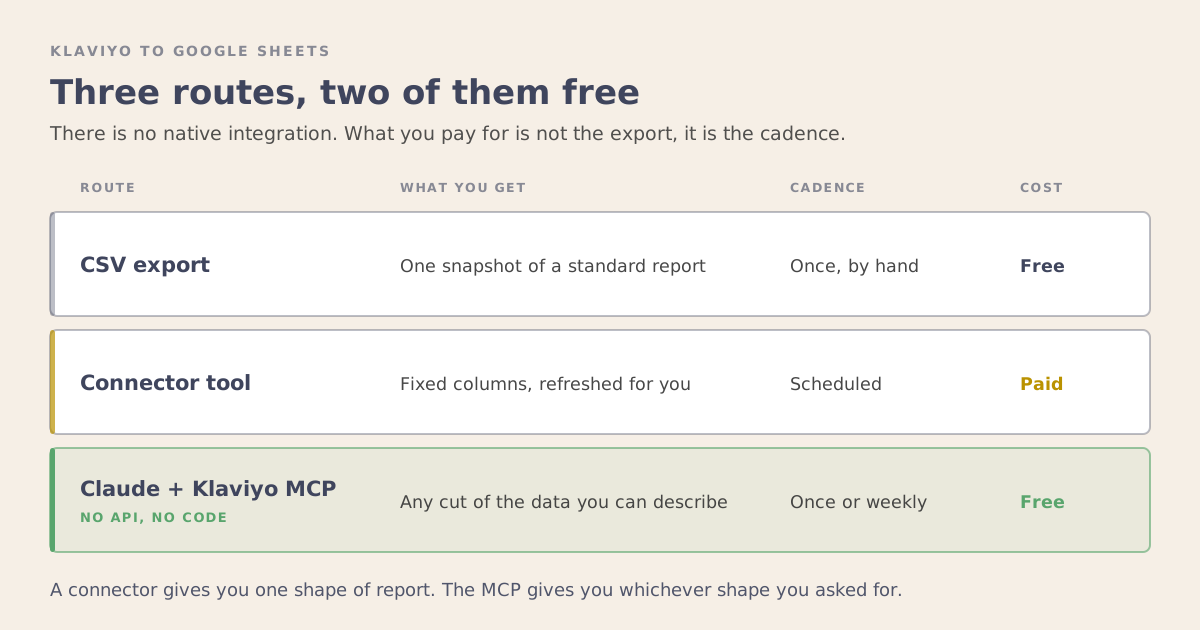
There are three ways to do this. Here is what each one is actually for.
First, Decide Which Job You Are Doing
“Klaviyo Google Sheets integration” covers two completely different tasks, and people searching it are split between them.
Getting data out. Campaign performance, flow revenue, segment counts, profile exports. You want Klaviyo numbers in a spreadsheet so you can build a view Klaviyo does not give you, or hand something to a client who will not log in.
Getting data in. You have a list of profiles in a sheet, from a trade show, a giveaway, a legacy system, and you need them in Klaviyo with the right properties attached.
Most of what follows is about getting data out, because that is the harder problem and the bigger share of the searches. The last section covers going the other way.
Route One: The CSV Export
Klaviyo exports a CSV, a plain spreadsheet file, from Campaigns, Flows, Analytics and segment views. Download, open in Sheets, done.
I mention this first because it gets dismissed too quickly. If you need a number once, this is the correct answer, and anything more elaborate is procrastination dressed as infrastructure.
What it costs. Nothing.
Where it breaks. The moment you need it again. A CSV is a snapshot, so a weekly report means doing the whole thing weekly, and a month later nobody can tell you which export a given tab came from. Every manual reporting process I have inherited failed the same way. The export was fine. The person doing it stopped, and nobody noticed for 6 weeks. That is the difference between using a tool and having a workflow, and it applies to spreadsheets as much as it does to AI.
Use it when the answer is needed once, or the sheet is a scratchpad rather than a report.
Route Two: A Connector Tool
This is what the search results push you toward, and for standing reports it earns its place.
A connector logs into Klaviyo with your permission, lets you pick the fields you want, writes them into a sheet, and then refreshes on a schedule you set. On most of them the shortest interval is measured in minutes rather than hours, which is far more frequent than any reporting cadence actually needs.
The refresh is the entire value. You are not paying for the export, you are paying to never think about the export again.
What it costs. These are paid tools with free tiers that are usually too small for real client reporting. Check current pricing before you commit, because it moves, and check whether the limit is rows, refreshes or the number of sheets it can write to, because that determines whether the free tier is genuinely usable or just a demo.
Where it breaks. Three places, in my experience.
You get a fixed set of columns. The connector pulls the fields it supports, in the shape it supports. If the question you have needs two metrics combined in a way the connector does not offer, you end up combining them yourself in the sheet, and now the sheet is the fragile part.
You get another subscription and another login, per client, sitting between you and your data. For an agency that is real overhead.
And a scheduled refresh answers the same question forever. That is exactly right for a dashboard someone checks every Monday. It is the wrong tool for the question you have once and then never again, which in practice is most questions.
Use it when you need a live dashboard that updates without anyone touching it.
Route Three: Claude With the Klaviyo MCP
This is the route the guides leave out, and it needs no developer work and no code.
Klaviyo has an MCP connector, which is a plug-in that lets Claude work with your account once you have given it permission. So does Google Drive. Both are on my list of the MCP servers I actually use. You connect them to Claude, and then you ask for what you want in plain English. Claude reads the account, works out the numbers, and saves them as a new Google Sheet.
MCP is the piece that removes the developer from this picture. Nothing gets built and there is no password or access key to copy anywhere. You authorize a connection the same way you authorize any app, and Claude can read the account from there.
What makes it different from a connector is that you ask a question instead of syncing a fixed set of columns. Speed and cost are both better too, but they are the smaller part.
A connector gives you campaign performance, every day, in the columns it supports. With the MCP route you can ask which campaign types earned the most per recipient for this account in the last quarter, split by segment, and get a sheet that answers only that. Then you can ask something else tomorrow, and the shape changes to fit.
This is where the interesting work lives. Predicting when a customer will reorder and building RFM segments both need a cut of data that no standard report hands you, and both are questions rather than dashboards.
That is a different kind of tool. A connector gives you one shape of report, over and over. This gives you whatever shape answers the question.
It also runs on a schedule, which is the part most people miss about it. The same connection can run as a repeating task, so a report arrives without you asking for it each time. I run one of these every Monday morning for a client’s weekly tracker. Before anyone is at their desk, Claude pulls the week’s numbers from Klaviyo: campaign and flow revenue, deliveries, unsubscribes, sign-ups, and the split between sale and non-sale sends. It works out revenue per recipient and the other derived rows, then lays everything out in the same order as the tracker. By the time the Monday call starts, the week is on the table.
So the choice between asking once and having it arrive every Monday is a setting rather than a second purchase.
One honest limit. Each run saves as its own new sheet, with the numbers already laid out in tracker order. Moving them into the master tracker you keep is the one manual step, and it takes about a minute.
What it costs. A Claude subscription you likely already have, and nothing else. Both connectors are free.
Where it breaks. Both connections have to be live, because Klaviyo alone can read and cannot write anywhere, and Drive alone has nothing to write. The output is also only as good as the request, so a vague question gets a vague sheet. A connector’s fixed set of columns is a limitation and a guardrail at the same time.
Use it when the cut of data you need does not exist as a standard report, whether you want it once or every week.
Going the Other Way: Sheets Into Klaviyo
Uploading is simpler and has fewer options.
Klaviyo takes a CSV upload into a list, and it will map columns to profile properties during the import. That covers most cases, and it is what I use for event lists and offline signups.
The part worth slowing down on is the mapping. Custom properties created during a hasty import are how accounts end up with three fields that mean the same thing, spelled differently, none of which segment cleanly. Decide the property names before the upload, not during it. If the account already has properties, match the existing spelling exactly.
If the sheet is the ongoing source of truth rather than a one time list, a connector can run that direction on a schedule too. That is rarer than people expect, and usually a sign the data should be coming from the store rather than a spreadsheet.
Which One to Use
Once, for one answer: export the CSV.
A standing report on a fixed set of fields, set up by clicking through a settings screen with no describing required: a connector, and expect to pay for it.
Anything where the shape of the answer matters, whether you need it once or every Monday: Claude with the MCP.
Most accounts I see buy the connector first, because the connector is the thing being advertised. The better question is whether the report a connector can hand you is the one you actually wanted.
Before You Build It
Two things to settle first, because both can make the work pointless.
What is the sheet for? If you cannot say who opens it and what decision it changes, you are building a report nobody reads. That is the most common outcome of these projects, and no amount of automation fixes it.
Does Klaviyo already answer this? Klaviyo’s own reporting covers more than most people use, and going through the account properly first usually turns up numbers someone was about to rebuild in a spreadsheet. The genuine reasons to leave the platform are joining Klaviyo data to something else, giving someone a view without giving them a login, or answering a question Klaviyo has no report for. If none of those apply, the integration is work you do not need.
The third route is the one worth trying first, because it costs nothing to test and it tells you within an hour whether the question you have is answerable at all. If it turns out you need the same answer every week, you have learned exactly what to point a connector at.
If you want a look at what your Klaviyo account can actually tell you, book a strategy session.