The MCP Servers I Actually Use for Ecommerce Email
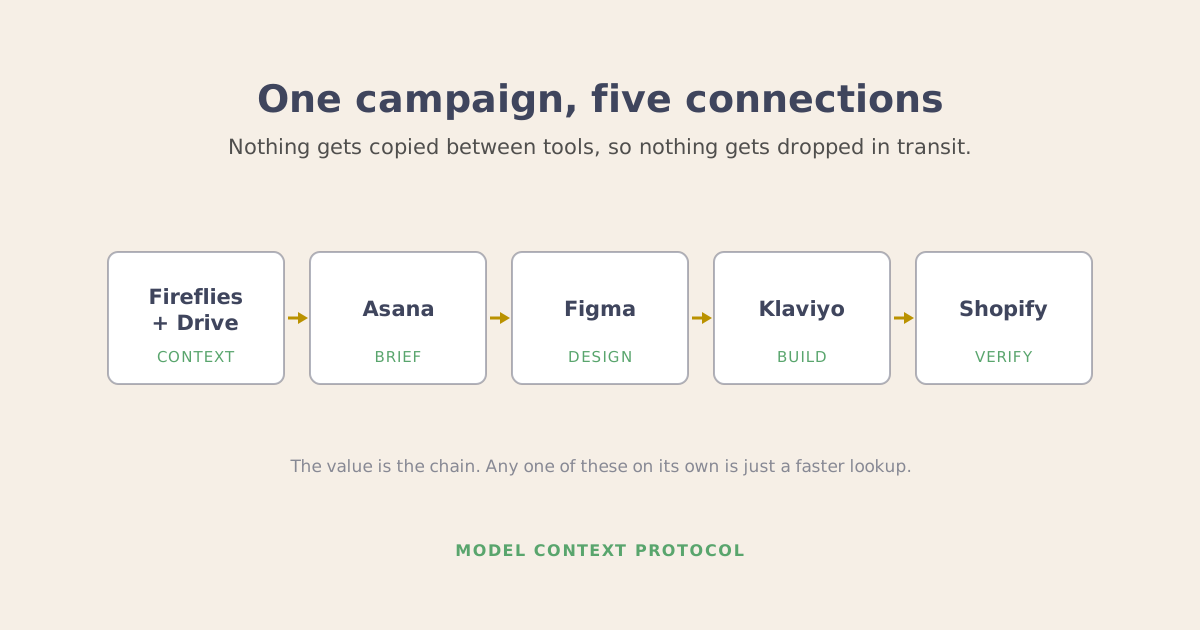
These are the 6 MCP connectors I have running on a normal working day, and what each one actually does once it is connected.
I am going to assume you know roughly what MCP is by now. The part that is harder to find, and the part that decides whether a connector is worth the 10 minutes of setup, is what each server actually reaches. Vendors describe the ambition. This is the inventory.
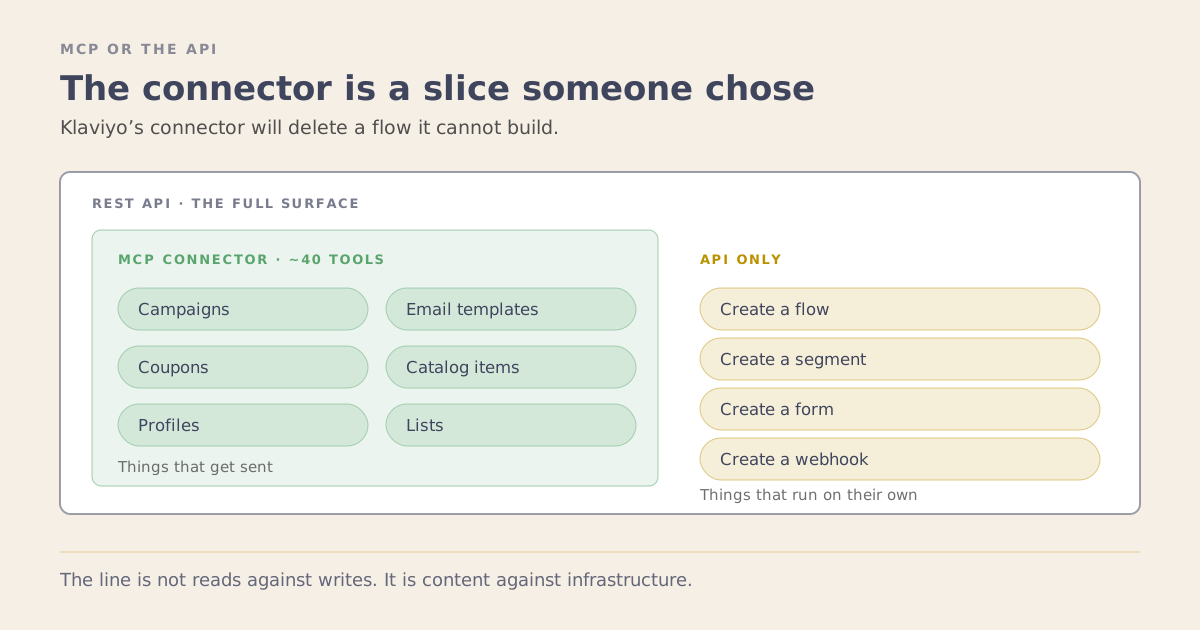
One thing worth saying before the list. Everything below is what the connector does, not what the platform can do. Every one of these sits on top of a much larger API, and the server exposes a slice of it that somebody chose. Where those two things come apart, I have said so.
Klaviyo
What it reaches. Campaigns, flows, segments, lists, templates, metrics, profiles, catalogs, coupons, forms, reviews, tags, images and webhooks. It reads all of that, including reporting: campaign reports, flow reports broken down by message, and aggregated metric data over a date range.
On the writing side it creates campaigns and clones them, builds email templates including proper drag-and-drop ones, creates lists, profiles, coupons and coupon codes, catalog items and variants, tags, custom metrics and universal content. It can render a template to check what it looks like.
One thing it will not create: a webhook. When I first wrote this in August the connector refused to create 4 things, segments, flows, forms and webhooks. Three of those have since arrived, so the list is down to one. Forms came with a catch: the connector saves a new form as a draft and cannot edit it after it is built. It reads webhooks and it will delete one with nothing but an ID, but it still will not make one. Everything below about flows is the correction, and it is worth reading because the shape of what changed tells you how to think about any connector.
Flows used to be the strange one. In August the connector could set a flow’s status, draft or manual or live, and delete the whole thing, but it could not build one or edit a step inside it. That looked backwards, since turning somebody’s abandoned cart flow off is a larger action than editing a subject line, and turning it off was the one it would do.
That gap is closed. The connector now builds a flow from a full definition, triggers, actions and all, and it edits individual actions inside one. Klaviyo’s own developer notes add a caution worth repeating, “Klaviyo does not recommend pre-creation of flows in customer accounts,” so the ability is there and they are telling you to use it carefully. Rewriting a whole live flow in one move is still the sharpest edit in the account, which is roughly where the remaining care sits.
The lesson is not the specific list, which will be shorter again by the time you read this. It is that a connector’s limits are a vendor’s decisions, and vendors revisit them. Check what the connector does today rather than trusting a table someone published, this one included. Verified against Klaviyo’s connector documentation on 5 September 2026.
What I use it for. Comparative questions, almost entirely. Klaviyo’s dashboards answer the questions Klaviyo anticipated, which are mostly “how did this perform”. The awkward ones are comparative: how does this segment’s repeat rate compare to that one, what share of a flow’s revenue comes from the first email rather than the rest, which flows have not been edited in a year, what proportion of the list has engaged with anything in 6 months.
All of those are answerable from the data. None of them is one click in the interface, which is why they mostly go unasked.
A real one. I checked a pop-up’s actual numbers rather than trusting a summary. The old forms were converting at 2.26% and 3.93%. The replacement, a multi-step form collecting zero-party data on the way in, came in at 9.11%, about 4 times the weaker form. The winning mechanic was asking a question during signup, with no bigger discount. That comparison took about a minute.
Where it stops. Role first: you need Owner, Admin or Manager on the account. The hosted server comes in two shapes and the difference matters if you run more than one account. The listed connector is the quick one and covers a single account. Several accounts means building a custom connector, and that is the part requiring a paid Claude plan. There is also a local server you run against a private API key, which is the route worth knowing if you keep client accounts properly separated, though it only works with Claude Desktop, Cursor and VS Code. One setting is worth turning on regardless of route: a read-only mode that switches off every action that changes the account, so Claude can answer questions but cannot touch anything. If all you want is the comparative reporting below, that is the safe way to run it.
Shopify
What it reaches. Products, variants, collections, orders, customers, inventory levels by location, discounts, and analytics through ShopifyQL. The analytics go further than people expect: sessions, conversion rate, returning customer rate and revenue grouped by referrer source are all queryable, which is a slice of the attribution picture without any separate tool.
There is also a general GraphQL escape hatch, which matters more than it sounds. The Admin API covers hundreds of resources and the convenience tools only wrap the common ones. Metafields, metaobjects, pages, blogs, markets, translations and gift cards are all reachable through raw GraphQL.
And unlike Klaviyo’s, it writes properly. It creates and updates products and collections, bulk-updates product status, creates discount codes, and sets inventory quantities at a given location.
Read those last two again. It will create a discount code, though it now insists you state a start time and who is eligible before it makes one, rather than defaulting to live and everyone. It will change your stock numbers.
The interesting contrast is how differently two vendors treat the same protocol. Klaviyo hedges its most dangerous write, a whole live flow, with a documented caution and a read-only switch. Shopify will let a model put a percentage off the entire catalog, and its guard is narrower and more literal: the discount tool now stops and asks for a start date and an audience rather than assuming them. Same protocol, two vendors, two different theories of which mistakes to prevent.
To be fair to Shopify, the inventory tool is built carefully. It wants the current quantity passed back to it as a comparison value, so the write fails rather than overwriting the newer number if stock moved between reading and writing. That is a proper safeguard and more than most tools bother with.
What I use it for. Almost entirely reading, despite all of the above. Anything that depends on what is actually true right now. Prices, variant names, what is in a collection, what is in stock and where.
A real one. Every campaign brief pulls live per-SKU stock at build time. If a featured product is under roughly 50 units and the send is going to a whole list, that gets raised before the design is approved rather than after the email lands. Promoting something into a sellout is expensive, specific and entirely preventable, and preventing it needs one thing: the stock number being present at the moment somebody decides.
Where it stops. Inventory is per location, so a single “in stock” number can mislead badly for a brand with several warehouses or retail stock. Read the location breakdown, not the total.
Figma
What it reaches. Design context for a selected frame, component and variable definitions, screenshots, file metadata, Code Connect mappings, and writes to the canvas.
What I use it for. Turning a design into something buildable without a person interpreting it in between. When the component structure and variable definitions can be read directly, a frame stops being a picture and becomes a specification. Design tokens come from the file rather than being restated in a prompt, which is what stops colors and spacing drifting between emails.
A real one. Components map to email blocks. Hero component, hero block. Product row component, product row block. Once that correspondence exists and can be read, output stops varying between builds, because there is no decision left to make. That mapping is the whole basis of building a Klaviyo template from a Figma design rather than slicing it into images.
Where it stops. Two things. Your designs have to be built from components. A file of loose grouped elements arranged to look like an email has no structure to read, and no tooling fixes that. And writes to the canvas are considerably fussier than reads, so treat reading a design and building one as different levels of maturity.
Asana
What it reaches. Tasks, projects, sections, custom fields, comments, attachments and search. Reads and writes.
What I use it for. Keeping the campaign brief as the single source of truth. Every campaign is a task carrying the copy, the segment, the send time, the inclusions and exclusions, the product links. When that lives across an email thread, a spreadsheet and a message instead, building becomes reassembly, and reassembly is where things get missed.
It also makes the calendar answerable. What is not scheduled yet this month becomes a question rather than an audit.
A real one. A build session takes two links as input: the Figma frame and the Asana task. Everything the build needs is already inside one of those two.
Where it stops. Advanced task search is a Premium feature. On a free workspace you can list and filter but not run the full-text search, and even on Premium that search covers task names and descriptions rather than comments, which matters the moment you go looking for that campaign from March.
Fireflies
What it reaches. Call transcripts, summaries, soundbites, and search across all of it with filters for date, participant and keyword scope.
What I use it for. Retrieval from my own spoken record. The search takes a real query grammar, so you can pull every call in a date range where a topic came up, narrowed to specific people.
A real one. The clearest explanation of your own methodology is almost always something you said out loud to somebody who asked a good question, not something you sat down to write. Those explanations already exist in your call history. Being able to search them turns a back catalog into a content pipeline, and more usefully into institutional memory that survives somebody leaving.
Where it stops. It only knows about calls that were actually recorded, which sounds obvious and still catches people out.
The bigger one is that this connector writes, and the writes go further than you might expect. It can share a meeting, change a meeting’s privacy setting and revoke somebody’s access, and it can also cut a clip from a call, one of them with a public setting, rename a meeting and move it between folders. Transcripts already contain everything that was said, including plenty a client would not expect to see published, so anything mined out of them needs a deliberate confidentiality pass. Knowing that the same connection can also change who is able to read them is worth holding onto.
Google Drive
What it reaches. File search using a structured query syntax, file contents and metadata, plus creating a file, and moving, copying, sharing and trashing one.
What I use it for. Grounding. Brand guidelines, positioning documents, past reports, tone references. This is the layer that makes output sound like the brand rather than like competent generic marketing.
Where it stops. The search syntax is more restrictive than the Drive interface. Full-text search behaves differently from what the search box trains you to expect, so plan on being more precise than usual.
The Analytics Layer Just Opened Up
Everything above is a platform connector. The layer that sits above them, the analytics and attribution tools, was closed until recently and is not any more. If a brand runs either of these, they are the next two I would connect.
Triple Whale ships an official MCP server, documented on their site, with a hosted server URL and OAuth2 at read-only access, so it cannot change anything in the account. You add it as a custom connector in the tools that support one, Claude among them.
Polar Analytics has one too, and its design is the more interesting of the two. Rather than exposing raw tables for a model to write SQL against, it exposes a defined metrics layer, so you query agreed definitions instead of hoping a generated query means what you think it means. Worth flagging that most of what is published comparing the two comes from Polar themselves.
The reason this matters more than another connector is what it makes answerable. Klaviyo can tell you what email earned. It cannot tell you what email earned against everything else that was happening that week. Attribution tools can, and until this year that answer lived behind a dashboard somebody had to go and read.
What Is Still Missing
Brand-side analytics is arriving. The agency layer has not.
The consolidated view across many client accounts is the one I would most want to interrogate conversationally: which clients are trending down, where the same problem shows up in three accounts at once. Those tools are built for agencies rather than brands, and they are still shut.
Hiro Analytics is the clearest example, because it exists specifically to automate reporting for retention agencies across Klaviyo, Attentive, Postscript, Omnisend, Yotpo and Sendlane. Exactly the shape of thing you would want to ask questions of. As far as I can find, it publishes no MCP server, and nothing public about an API either. If that has changed I would genuinely like to know.
That is the more interesting absence. Cross-client synthesis is the thing an agency cannot get anywhere else, and it is exactly the kind of question a model is good at.
Where to Start
Connect them in this order:
- Klaviyo, because it answers the most questions per unit of effort
- Shopify, because it makes the Klaviyo answers real
- Your project tool, because that is what turns answers into work that happens
Figma, call transcripts and document storage come after. Powerful, but only once the first three are producing something worth designing and briefing.
The most common mistake is connecting everything at once and using none of it. One connection you interrogate daily beats 6 you configured and forgot.
That is the same trap as owning AI tools without having AI workflows. A connector you never ask anything is a subscription, not a system.
If you want a second opinion on which parts of your stack are worth connecting first, book a strategy session.