How to Hit Your Q4 Goal, Week by Week, With Claude
The Q4 goal gets agreed on the planning call, and then everyone goes back to their own screen. Paid reads Google Ads and Meta. Email reads Klaviyo. The owner reads the store admin. Every number is real. But nobody can say whether, together, they add up to the goal until the month has closed. In Q4, by the time you know, the weeks that mattered are gone.
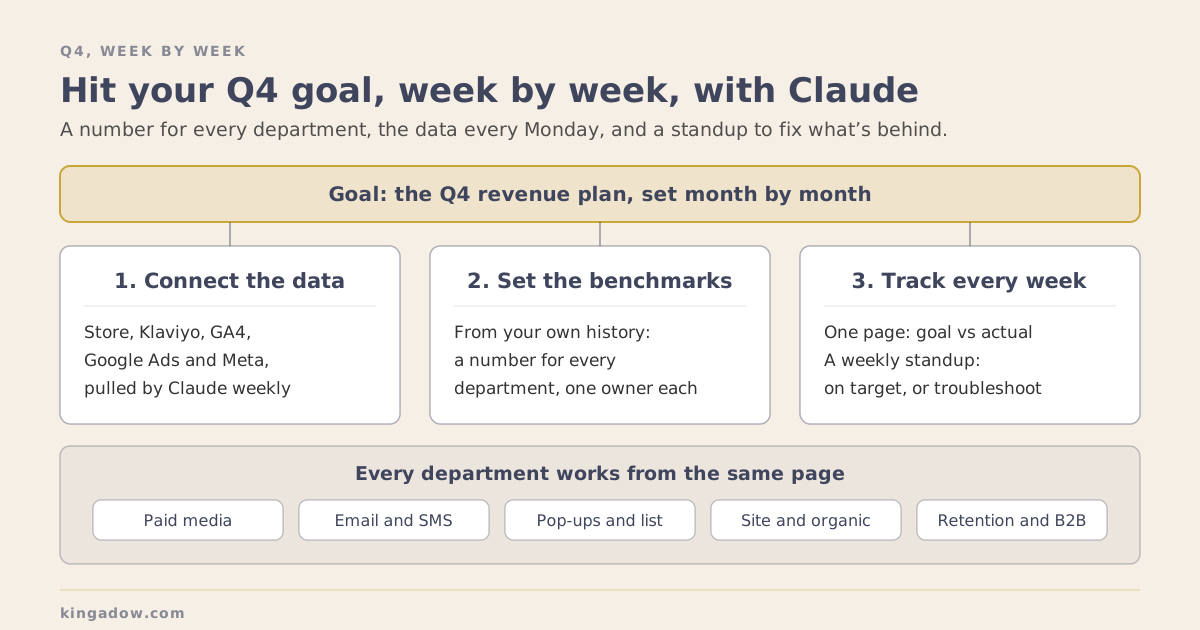
The fix is a weekly rhythm. Give every department its own number for the week, built from your own history. Every Monday, put the week’s actual numbers in front of the team, without anyone having to pull reports. Then use the meeting to work on whatever is behind. Claude makes the middle part easy: it can pull the data straight from your store, Klaviyo, GA4, Google Ads and Meta, every week, on its own, through direct connectors or a connector service like Windsor.ai.
This October I set that up with a brand heading into its biggest quarter. Here’s how it works, step by step.
Why Q4 Goals Slip
The owner already had a dashboard. He entered the numbers into it by hand, and it drew trend lines for orders, conversion rate, ad sales and average order value. It was built to show whether the business was steady. Finding where a problem sat, and who owned the fix, needed a different kind of page.
On our first call about it I said it plainly: we were missing the benchmarks and KPIs that show how to get to the goal. A revenue target tells a team where to end up. A benchmark tells each department what its share of that looks like this week, measured against what the brand has actually done before.
When the owner explained the change to his team, he put it this way:
“Instead of coming at the end of the month saying, oh, we were down 10% or we were up 20%, you know, well, there’s nothing you can do about it. It’s already too late.”
In Q4 that cost is higher than in any other quarter. A slow October leaves November and December more to make up, and the peak weeks are too short to find a problem late.
Step 1: Set the Number From Your Own History
Every target starts from where your brand actually is. For this brand, the Q4 projections came from 3 years of its own orders, adjusted for where the holidays fall this year, with a commit plan and a stretch plan. It’s the same principle as calculating customer lifetime value from your own orders: your history is the best guide you have.
Then spread the goal across the weeks the way your sales actually fall. We learned this one in the first week. The email and SMS target had been worked out as a flat share of the whole quarter, and October naturally earns a smaller share than the peak weeks, so it set October too high. Rebuilt on last year’s day-by-day pattern, the target matched how the month actually sells, and the same curve showed when sales should start to climb.
Step 2: Give Every Department Its Own Number
On the team’s Q4 strategy call, each department set its own number. Paid search came with a projection, I brought one for email and SMS, organic search brought a range, and the owner asked everyone to take ownership of theirs.
Each number gets one owner and one deadline: due every Monday at noon.
One honest wrinkle. Add up every department’s own number and you get more than the store will make, since each channel’s reporting claims some of the same orders. So the store total is the number everyone answers to, and each channel number is read as that channel’s view of it. I explain why each channel’s numbers can run high in an earlier post on email attribution.
Step 3: Let Claude Pull the Numbers Every Week
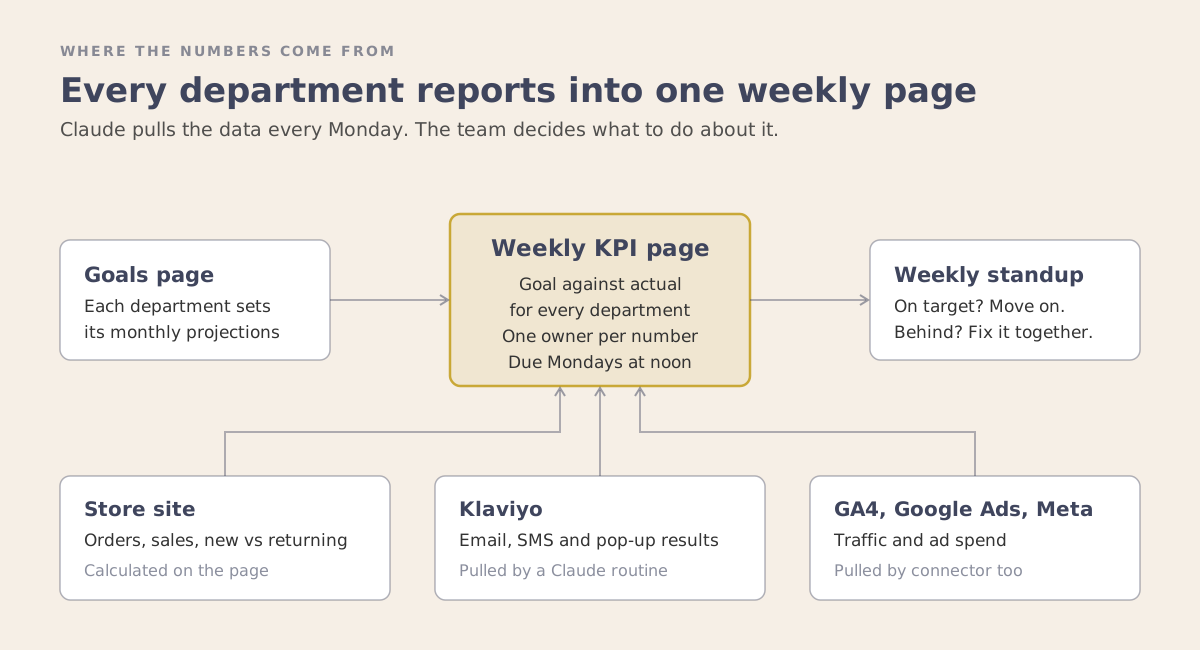
This is the step that used to be the hardest. Pulling the numbers from every platform each Monday had to be done by hand, or someone had to build and maintain a dashboard. It was tedious work, so in a busy week it got skipped, and Q4 is all busy weeks. Claude has made it easy.
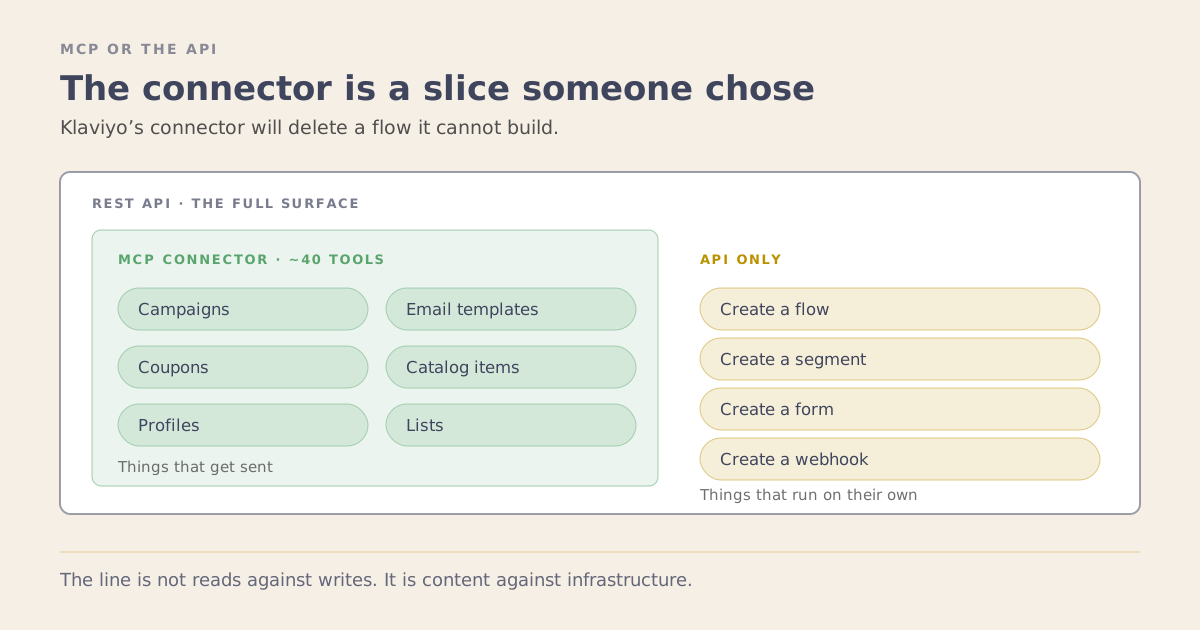
Claude reads the brand’s order database directly through an MCP connector. MCP is an open-source standard for connecting AI applications to external systems: with a connector in place, Claude can query the store’s orders the way an analyst would, with no exports and no copy-paste. Email, SMS and pop-up results come from Klaviyo through its API, and Klaviyo now offers its own connector as well. GA4, Google Ads and Meta can be pulled the same way, through their own connectors or a service like Windsor.ai, so nothing on the page has to be typed in by hand.
The difference shows up in small moments. Minutes before that Q4 strategy call, I asked Claude how October was pacing, and it answered from the store’s live orders. Nobody had to pull a report first.
Every Monday morning a routine runs on its own: it pulls the week from Klaviyo and the store, saves my 11 numbers to the team’s page, and a week later re-saves them once Klaviyo’s 5-day attribution window has closed.
The routine is a scheduled task in Claude Code: written instructions plus 2 small scripts Claude wrote. One pulls the week from Klaviyo’s API. The other saves the numbers to the team’s page through an API token the owner added. The store’s numbers come from read-only queries through the MCP connector. In the first week, before the token existed, Claude typed the numbers into the page through the browser while I was signed in.
I list the connectors I use in my post on MCP servers for ecommerce email.
Step 4: Put Every Department on One Page
The numbers land on one page the whole team can see:
- Every department’s goal sits next to its actual for the week.
- Each person can save only their own numbers, due Monday at noon. Anything saved later is marked late.
- The store’s own numbers calculate on the page: orders, sales, new versus returning customers, sessions and conversion rate.
- Each owner can add a short note on their week.
When the owner told his team about the page, he said:
“Everyone will be able to see everyone else. So it’s not going to be like a hidden, your only metric.”
He built the page himself, with Claude, in 5 days. I demoed my own tracker on a Wednesday, sent him the spec on Friday, and by Monday his version was live inside his store admin. The next day he added an entry token so my Monday numbers could arrive without anyone logging in.
Step 5: Hold a Weekly Standup, On Target or Troubleshoot
The page earns its place in the conversation it starts. The question I put to the owner on that first call is still the whole agenda: how did we do last week, are we on schedule, and if we’re behind, which channel is underperforming?
With the numbers in by noon, each department checks its own line against target. When one is behind, the team works out why and agrees the fix before the next week starts.
In the first week, email flow revenue was running behind last year. I traced it with Claude to the abandoned cart flows: the original versions had been switched off, and the live ones open with a plain reminder before any offer. That’s a fix you want in October, well before the peak weeks.
How I Set This Up for Brands
I design the system. Your team builds it with Claude.
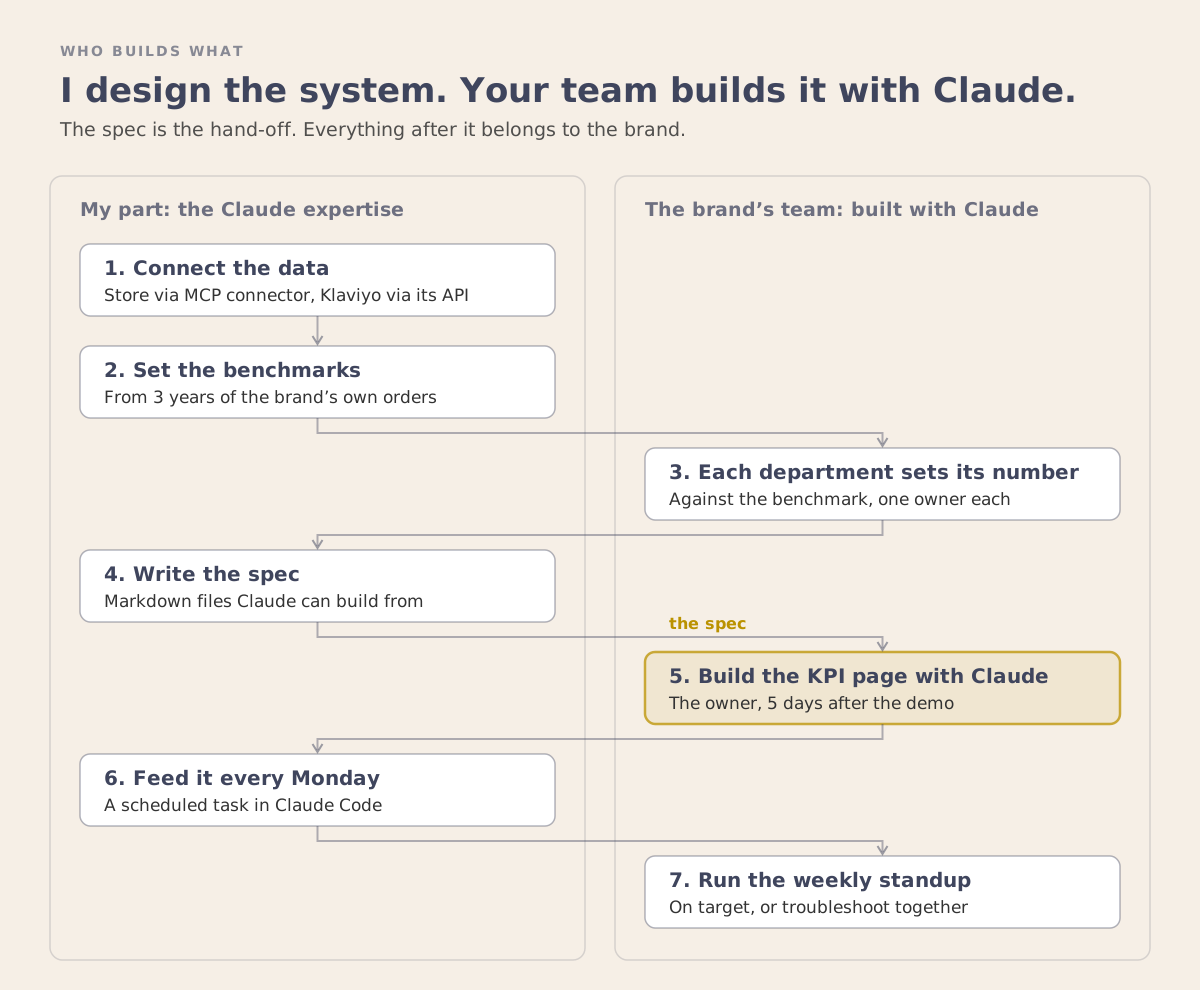
My part is the Claude expertise: knowing which data to connect and which connectors or MCP servers to use, which benchmarks to set, who owns which number, and how the weekly rhythm runs. I write it down as a spec, a set of Markdown files that Claude reads as instructions and a person reads as a plan:
- The inputs. A revenue target and 2 levers for each month, average order value and conversion rate, plus 7 shared assumptions from the brand’s recent history.
- 15 formulas. Every other number calculates from the inputs, down to the most the brand can pay for a new customer and still break even.
- 34 KPIs in 8 channel tables. Store, paid media, organic search, email, SMS, pop-up and list growth, retention, and B2B orders, each with a column for its owner.
- Data definitions, so every number on the page means the same thing to everyone.
- A worked example with made-up numbers. If the build reproduces the example table, the formulas are wired correctly.
To start, you need:
- A revenue goal for the quarter.
- Claude connected to your store data and your email platform, through a connector or a developer who can add one.
- One owner for each department’s number.
- Someone on your team willing to build with Claude.
- A standing weekly meeting.
Q4 rewards the brands that find their problems in week two. A number for every department, the actuals every Monday, and a standup to fix what’s behind is how you get there.
If you want this set up for your team before the peak weeks, book a strategy session.